An AI Note Taker for Showings: What It Captures—and What Comes Next
Three showings back to back on a Saturday. The buyer in house #1 said the backyard was a dealbreaker, unless the price came down. Or was that house #2? By the time you're back in the car, the details that win the offer are already blurry.
Here's the tool I wish I'd had when I started: a clip-on AI note taker about the size of a stick of gum. You wear it during a showing, a listing appointment or a buyer consult, and it turns the conversation into a summary with preferences, objections and next steps. Here's what it captures, what it costs, and how you could use one, step by step. (To be clear: the examples below are how I'd try it, not a product review.)
Before you hit record: ask first. Recording laws vary by state, and some states require everyone in the conversation to agree before you record. Check your state's law and your brokerage's policy, and the simple habit is: ask permission, every time, before you record anyone. This isn't legal advice, so talk with your broker or an attorney.
Key takeaways
Wearable AI note takers like the Plaud NotePin S record in-person conversations and turn them into summaries and next steps.
For calls and video meetings, an app like Granola takes notes from your computer audio without a bot joining the call.
Ask permission every time. Then turn the summary into follow-ups the same day.
In this guide
What a clip-on AI note taker actually does
The two tools worth knowing
Four places you could use it
Your first-use checklist
Copy-paste prompts
Where it falls short
FAQ
From one agent to another
What a clip-on AI note taker actually does
When I taught school, the best lesson plans came from what kids actually said, not what I remembered they said. Showings are the same. These devices do three things:
Record the conversation (with permission) from a small device you clip on or wear on a lanyard.
Transcribe it and label who said what.
Summarize it into what matters: what the buyer loved, what they hated, what they'll stretch for, and what you promised to do next.
The magic isn't the recording. It's walking out of the third showing with notes you didn't have to write.
The two tools worth knowing
Last checked: Oct 26, 2026. Prices and plans change, so check each company's page before you buy.
Plaud NotePin S (in person: showings, open houses, listing appointments)
Per Plaud's product page:
Cost: $179 (USD) for the device.
Subscription allowance: the Starter plan included with it covers 300 transcription minutes a month. Plaud sells bigger plans (1,200 minutes a month, or unlimited) if you run out.
In person vs calls: it's built for in-person conversations you wear it for. For online meetings, Plaud points you to its desktop app, which records without a bot joining the call.
Practical limits: a highlight button (short-press) flags key moments, battery is listed at up to 20 hours of recording, and it still needs the Plaud phone app (iOS or Android) to process your notes.
Granola (calls and video: buyer consults, lender and title calls)
Per Granola's site and pricing page:
Cost: a Basic plan at $0 with limited meeting history, and a Business plan at $14 per user per month with unlimited notes and history.
In person vs calls: it records your computer's audio, so no bot joins Zoom, Meet or Teams. Its mobile apps cover phone calls and in-person meetings.
Platforms: macOS, Windows, iOS and Android.
Practical limits: it's a notepad, not a wearable, so it's a better fit for calls than for walking a house.
Plaud also has a real estate page if you want to see how it pitches the device to agents.
Four places you could use it
These are examples of how an agent could use a note taker, not a report on my own testing.
1. The Saturday showing tour
Ask at the first house: "Mind if I record today so I don't miss anything you say about these homes?" Tap highlight when they react, good or bad. By house #4, you have their reactions in their words, not yours.
2. The open house
Don't leave it running at the sign-in table. Treat each visitor as a separate conversation: when someone starts asking real questions, ask, "Mind if I record our chat so I get your questions right?" Record only if they say yes, and stop when they walk on to the next room. Afterward you have that visitor's questions and timeline, so your follow-up says "You asked about the roof age. Here's what I found." instead of "Thanks for stopping by!"
3. The listing appointment
Sellers tell you everything in the kitchen: the repair they skipped, the date they need to be out, the number they'd accept. Tap highlight when they say it. Your recap email can match their exact words, which tells them you listened.
4. The buyer consult on Zoom
Use Granola. When the call ends, you have their must-haves, their deal-breakers and what you promised to send, ready for a same-day recap.
Your first-use checklist
1. Pick one tool for one situation. Showings and open houses: a wearable. Calls and video: a computer app. Don't start with both.
2. Write your permission line. One sentence you'll say every time, like "I use a note taker so I don't miss anything. Okay if I record?" If they say no, put it away and say thanks.
3. Get your brokerage's guidance. Ask about your state's consent rules and your brokerage's policy on recording and storing client conversations. This can take a few days, so start before your first showing.
4. Set your summary template. Use Prompt #1 below so every summary comes out the same way.
5. Block 10 minutes after every appointment. Review the summary and turn it into follow-ups before you drive to the next one. Follow your brokerage's retention policy for the recordings.
Copy-paste prompts
Paste these into your note taker's custom summary template, or into any AI chat along with the transcript. Remove private financial or ID details first.
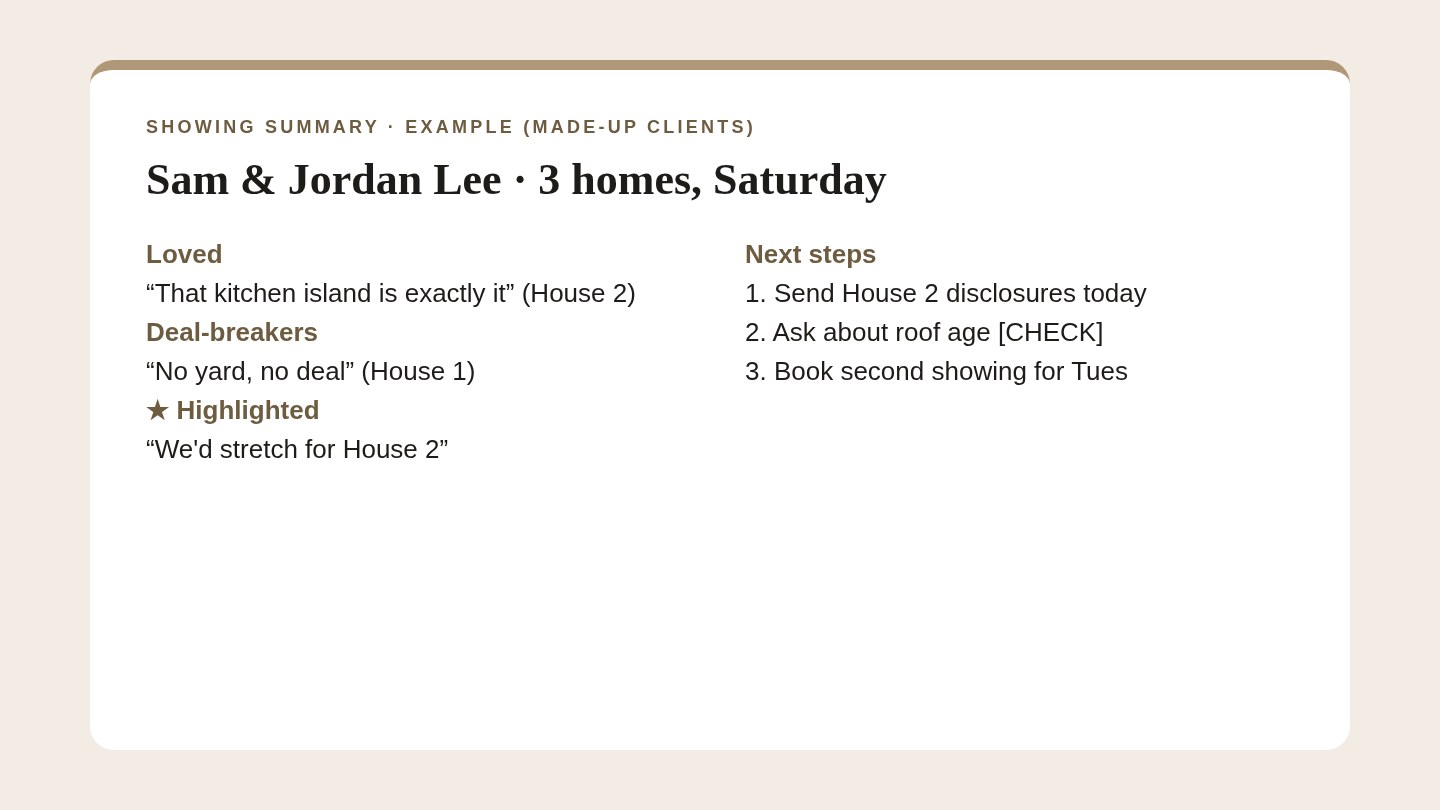
Prompt #1: Showing summary
Copy-paste prompt
You're summarizing a home showing for me, a licensed
real estate agent. From this transcript:

1) Each home: what the buyers LOVED, DISLIKED, and asked about.
   Use their exact words in quotes.
2) Highlighted moments first.
3) Deal-breakers and "would stretch for" items.
4) What I promised to do, with a [CHECK] if no date was set.
5) List any preferences or rankings the buyers explicitly
   stated. If they didn't rank the homes, say so.
6) Flag any uncertain speaker label or unclear quote as
   [UNCLEAR] instead of guessing.

Only use what's in the transcript. Don't describe neighborhoods,
schools or who a home is "perfect for."
Prompt #2: Listing appointment recap
Copy-paste prompt
From this listing appointment transcript, list:
- The sellers' must-have move date and any flexibility
- Repairs, updates or known issues they mentioned
- Their questions I still need to answer
- What I promised to send, and by when

Then draft a short recap email (under 150 words) in my voice:
warm, plain words, no hype. Mark missing facts as [CHECK].
Draft only. I'll review it before it goes anywhere.
Prompt #3: Open house follow-ups
Copy-paste prompt
From this open house transcript, make a list of each visitor
I spoke with: first name (if given), what they asked, their
timeline, and whether they have an agent.

For each one without an agent, draft a 2-3 sentence follow-up
email that answers their actual question. Mark anything I need
to confirm as [CHECK]. Draft only.
Where it falls short
Not everyone will say yes. Some clients won't want to be recorded, and that's their call. Have your notebook ready.
Noisy rooms. A busy open house or a windy backyard can garble the transcript. Highlight key moments so the important parts are easy to find.
Summaries can be wrong. AI can mix up who said what. Read the summary before you act on it, and check numbers against the transcript.
It's client data. Read each company's privacy and security page, and follow your brokerage's retention policy.
Transcription minutes run out. Heavy weekends can burn through a monthly allowance, so check your plan.
FAQ
Is it legal to record a showing?
It depends on your state and the situation, which is why the rule is to ask permission every single time. This isn't legal advice. Ask your broker or attorney.
Do I need the device, or can I use my phone?
Your phone works. The wearable's advantage is that you don't have to hold it, it has a highlight button, and doesn't sit on the counter like a phone face-up recording everyone.
What about the other agent at a showing?
Ask them too. If anyone in the room says no, don't record.
What do I do with the summary?
Same day: send the follow-up, set the next task, and put any promised date on your calendar. Notes you don't act on are just a nicer filing cabinet.
Keep reading
From one agent to another
I'm Melanie, a working REALTOR® here in Austin and a former teacher. I still believe what I told my students: write it down, or it didn't happen. A note taker just does the writing. What you do with the notes is still the job: capture the conversation, review the notes, then organize the next action.
That last step is what I built Agent Suite for, the real estate CRM I use in my own business every day:
Tell Sabrina what's next, by voice. Once you've reviewed your notes, tell Sabrina, the AI assistant in Agent Suite, who needs what.
Follow-ups that don't slip. The next touch for each client lands in a follow-up plan, and dates sync to your calendar.
Replies you approve. Sabrina drafts email replies by voice, and nothing sends until you approve it.
The morning brief. Sabrina tells you who to call today, so Saturday's notes turn into Monday's calls.
Share this post with an agent friend who runs back-to-back showings.
This week, write your permission line and try a note taker on one showing. Then turn the summary into follow-ups before you leave the driveway.
Melanie
Melanie Byrne
Austin Realtor | Founder, Agent Suite
Melanie Byrne is an active Realtor in Austin and the founder of Agent Suite. Learn more at agentsuiteapp.com
